
How to have a multi-turn conversations in Claude API
The API is stateless. Claude doesn't store any of your conversation history. Here is how to have a multiturn conversation with the API
Multi-turn conversations allow you to have back-and-forth exchanges with Claude API, where the AI remembers the context of your previous messages.
This guide will show you how to implement this in Python.
Learn the basics on using Claude API here.
Prerequisites
First, install the Anthropic Python SDK:
pip install anthropicYou’ll also need an API key from the Anthropic Console.
The Basic Concept
Claude’s API is stateless, meaning it doesn’t remember previous conversations. To create a multi-turn conversation, you need to send the entire conversation history with each request. The conversation is structured as a list of messages with alternating roles: user and assistant.
Simple Multi-Turn Example
Here’s a basic implementation:
import anthropic
import os

# Initialize the client
client = anthropic.Anthropic(api_key=os.environ.get("ANTHROPIC_API_KEY"))

# Store conversation history
conversation_history = []

def chat(user_message):
    # Add user message to history
    conversation_history.append({
        "role": "user",
        "content": user_message
    })

    # Send request with full conversation history
    response = client.messages.create(
        model="claude-sonnet-4-5",
        max_tokens=1024,
        messages=conversation_history
    )

    # Extract assistant's reply
    assistant_message = response.content[0].text

    # Add assistant's reply to history
    conversation_history.append({
        "role": "assistant",
        "content": assistant_message
    })

    return assistant_message

# Example conversation
print(chat("Hi! My name is Alex."))
print(chat("What's my name?"))
print(chat("Can you suggest a hobby for me?"))
Result:

Interactive Chat Loop
Here’s a more practical implementation with a continuous chat loop:
import anthropic
import os

def main():
    client = anthropic.Anthropic(api_key=os.environ.get("ANTHROPIC_API_KEY"))
    conversation_history = []

    print("Chat with Claude (type 'quit' to exit)")
    print("-" * 50)

    while True:
        # Get user input
        user_input = input("\nYou: ").strip()

        if user_input.lower() in ['quit', 'exit']:
            print("Goodbye!")
            break

        if not user_input:
            continue

        # Add user message to history
        conversation_history.append({
            "role": "user",
            "content": user_input
        })

        try:
            # Get Claude's response
            response = client.messages.create(
                model="claude-sonnet-4-5",
                max_tokens=1024,
                messages=conversation_history
            )

            # Extract and display response
            assistant_message = response.content[0].text
            print(f"\nClaude: {assistant_message}")

            # Add to history
            conversation_history.append({
                "role": "assistant",
                "content": assistant_message
            })

        except Exception as e:
            print(f"Error: {e}")
            # Remove the last user message if there was an error
            conversation_history.pop()

if __name__ == "__main__":
    main()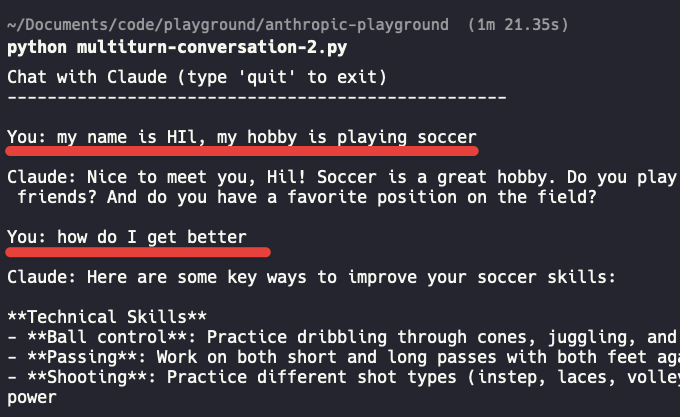
Adding System Prompts
You can also add a system prompt to guide Claude’s behavior throughout the conversation:
response = client.messages.create(
    model="claude-sonnet-4-5",
    max_tokens=1024,
    system="You are a helpful coding assistant who explains concepts clearly.",
    messages=conversation_history
)
Key Points to Remember
-
Maintain History: Always include the full conversation history in each API call
-
Alternate Roles: Messages must alternate between
userandassistantroles -
Stateless API: Each request is independent, so you manage the conversation state
-
Token Limits: Be mindful of token limits as conversations grow longer
-
Error Handling: Always include error handling for API calls
Managing Long Conversations
As conversations grow, you may hit token limits. Here are some strategies:
-
Summarize: Periodically summarize older parts of the conversation
-
Truncate: Keep only the most recent N messages
-
Smart Pruning: Remove less relevant messages while keeping key context
# Keep only last 10 messages
if len(conversation_history) > 10:
    conversation_history = conversation_history[-10:]