
Getting Started with Claude API (Python Tutorial 2026)
This guide will walk you through everything you need to start using the Claude API, from your first API calls with Python to create structured output
Hello 2026! This guide will walk you through everything you need to start using the Claude API, from getting your API key to making your first API calls with Python.
Prerequisites
Before we begin, make sure you have:
-
Python 3.7 or higher installed
-
Basic knowledge of Python
-
A text editor or IDE
Step 1: Get Your API Key
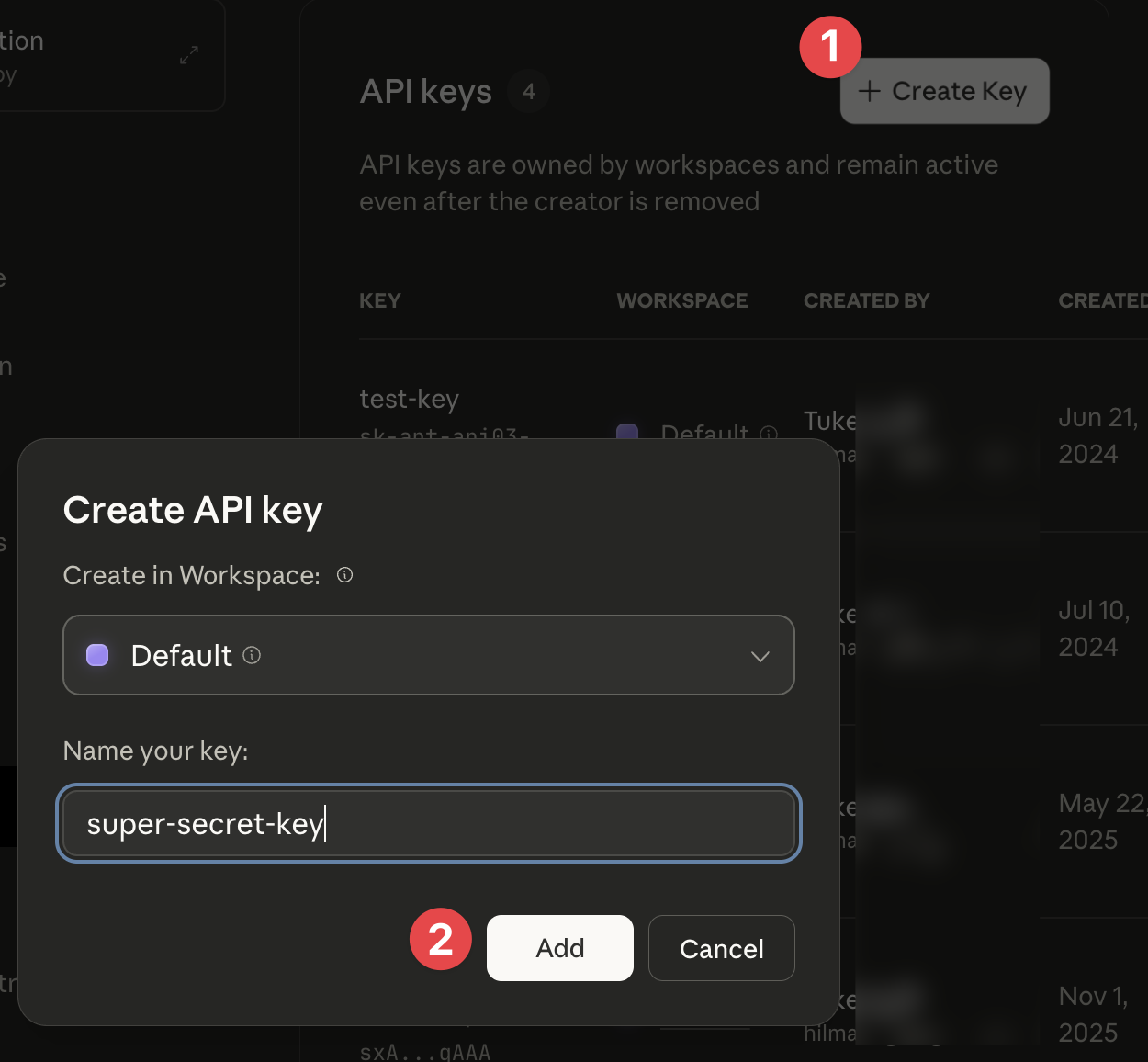
First, you need to obtain an API key from Anthropic:
-
Sign up or log in to your account
-
Click “Create Key”
-
Give your key a name (e.g., “My First Project”)
-
Copy the key immediately (you won’t be able to see it again!)
Step 2: Install Required Packages
Open your terminal and install the necessary Python packages:
pip install anthropic python-dotenv-
anthropic: The official Claude API client library -
python-dotenv: For managing environment variables securely
Step 3: Set Up Your Environment File
Never hardcode your API key in your code! Instead, use an environment file:
-
In your project folder, create a file named
.env -
Add your API key to this file:
ANTHROPIC_API_KEY=your-api-key-hereImportant: Add .env to your .gitignore file to prevent accidentally committing your API key to version control!
Step 4: Basic Message API Call
Now let’s make your first API call! Create a Python file called basic_call.py:
import os
from anthropic import Anthropic
from dotenv import load_dotenv

# Load environment variables from .env file
load_dotenv()

# Initialize the Anthropic client
client = Anthropic(
    api_key=os.environ.get("ANTHROPIC_API_KEY")
)

# Create a message
message = client.messages.create(
    model="claude-sonnet-4-5",
    max_tokens=1000,
    messages=[
        {
            "role": "user",
            "content": "Explain quantum computing in simple terms."
        }
    ]
)

# Print the response
print(message.content)
Run it with:
python basic_call.pyUnderstanding the Code
-
load_dotenv(): Loads variables from your.envfile -
model: Specifies which Claude model to use (Sonnet 4 is recommended for most tasks) -
max_tokens: Maximum length of the response -
messages: An array of message objects withroleandcontent
Step 5: Prefilling Claude’s Response
Sometimes you want to guide how Claude starts its response. You can do this by adding an assistant message:
import os
from anthropic import Anthropic
from dotenv import load_dotenv

load_dotenv()
client = Anthropic(api_key=os.environ.get("ANTHROPIC_API_KEY"))

message = client.messages.create(
    model="claude-sonnet-4-5",
    max_tokens=1000,
    messages=[
        {
            "role": "user",
            "content": "Which one is better, Mac or Windows?"
        },
        {
            "role": "assistant",
            "content": "I prefer Windows, because"
        }
    ]
)

print(message.content[0].text)
Claude will continue from where you left off!

This is useful for:
-
Ensuring consistent formatting
-
Getting straight to the answer
-
Enforcing specific output structures
Step 6: Using Stop Sequences for Structured Output
Stop sequences tell Claude when to stop generating text. This is especially useful when you want structured output like JSON:
import json
# ...
# same with previous setting
# ...

message = client.messages.create(
    model="claude-sonnet-4-5",
    max_tokens=1000,
    messages=[
        {
            "role": "user",
            "content": "Generate a JSON object with information about a book. Include title, author, year, and genre."
        },
        {
            "role": "assistant",
            "content": "```json"
        }
    ],
    stop_sequences=["```"]
)

# Extract and parse the JSON
response_text = message.content[0].text
book_data = json.loads(response_text)

print("Parsed book data:")
print(json.dumps(book_data, indent=2))
How Stop Sequences Work
-
We prefill with
```json\nto start the JSON code block -
We set
stop_sequences=["```"]to stop at the closing backticks -
This gives us clean JSON without extra explanation or closing markdown
This technique is perfect for:
-
Extracting structured data
-
Getting clean JSON/XML output
-
Controlling response boundaries
-
Building data pipelines
Best Practices
-
Always use environment variables for API keys
-
Handle errors with try-except blocks in production code
-
Monitor your token usage to control costs
-
Use appropriate max_tokens values (not too high, not too low)
-
Test with smaller models during development, then scale up
-
Add .env to .gitignore to protect your credentials
Next Steps
Now that you understand the basics, you can:
-
Try different Claude models for various use cases
-
Experiment with system prompts for better control
-
Explore multi-turn conversations by adding more messages
-
Build more complex applications with streaming responses
Troubleshooting
“API key not found” error: Make sure your .env file is in the same directory as your script and that you’re calling load_dotenv() before creating the client.
JSON parsing errors: When using stop sequences with JSON, make sure you’re prefilling with the opening code block and stopping at the closing one.
